FREE & OPEN SOURCE · WINDOWS
Notepad++
for Windows.
Your text, code and everyday edits. Get the free editor from its official source, then make it work your way.
Official download links · Installer, portable & ARM64 options
ONE WINDOW. MORE POSSIBILITIES.
Made for the files
you work with.
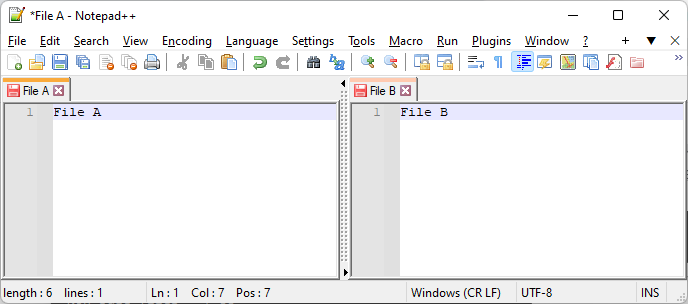
Open a quick note, inspect a configuration file or edit source code. Tabs, syntax highlighting and two editor views help you keep your place.
THE NEXT STEP
Get comfortable. Then get faster.
Install on Windows
Choose x64, ARM64 or x86 and complete your first setup.
READ THE GUIDE02Take it with you
Pick the right portable package and keep settings in its folder.
READ THE GUIDE03Extend your editor
Install, update and troubleshoot plugins with Plugins Admin.
READ THE GUIDE04Use fewer clicks
Find, replace and navigate using practical default shortcuts.
READ THE GUIDEBEFORE YOU DOWNLOAD
Good to know.
Installer choices, supported platforms and where the files come from.
Is Notepad++ free?
Yes. Notepad++ is free, open-source software released under the GNU General Public License. You do not need an activation key or a subscription.
Is there an official Mac version?
The official Notepad++ application targets Windows. This guide links to Windows downloads. Third-party apps with similar names are separate projects.
Which installer should I choose?
Match the package to your Windows system: x64 for a 64-bit Intel/AMD system, ARM64 for Windows on ARM, or x86 for a 32-bit system. The installation guide explains where to check.
Does this site host the installer?
No. Download links lead to the official Notepad++ site or the project’s official GitHub releases. The release page provides available packages and validation information.
Is this the official Notepad++ website?
This is an independent guide. It is not affiliated with the Notepad++ project. The official website is notepad-plus-plus.org.
Ready to make your first edit?
Get the editor from the project that builds it.